





Categorized in:
Cvent | Re-Enter Email Address
June 3, 2026 by melanie.jones@cu.edu
Did you know you can require registrants to enter their email twice while registering? This can help prevent registrants from moving too quickly and inputting an incorrect email address, which:
- prevents the registrant from getting relevant transactional emails about the event (like a registration confirmation or Know Before You Go)
- creates duplicates in Salesforce, requiring manual clean-up and fragmented Contact records
As a best practice, all templates now have this enabled. We also recommend any events launched in the future have "Display re-enter Email Address" enabled.
To enable this in your event:
- Navigate to your event's website >> Personal Information page.
- On the canvas, click the Email Address widget. Additional options will appear to the right.
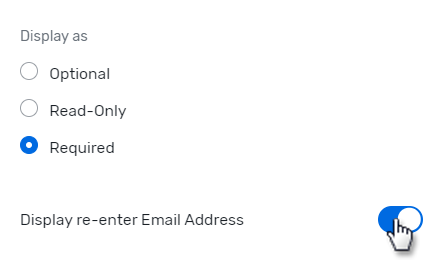
- In the Configuration Options section, toggle "Display re-enter Email Address" to blue/on.
- Once you're done, click Save to save the draft or click Publish to make it visible to invitees.