




All UIS enterprise and business applications are in service at this time.
The University of Colorado is transitioning from the current Tableau Private Server environment to Tableau Cloud.
This page will be updated throughout the migration phases. Please check back regularly for the latest information.
This initiative modernizes our analytics platform by providing a cloud-based service that improves scalability, simplifies platform management and enables future Tableau capabilities.
Throughout the migration, UIS will work directly with campus partners and Tableau site administrators to migrate content, validate dashboards and prepare users for the transition. Migration activities will occur in scheduled waves to minimize disruption and provide time for testing and validation.
Project Status
Migration activities are underway, and each site has been assigned a scheduled migration window.
Current project activities include:
- Migrating Tableau Server sites to Tableau Cloud.
- Supporting site administrators by troubleshooting issues during validation.
- Providing training and documentation.
- Monitoring migration progress and resolving issues as sites transition.
Project updates will be shared with site administrators regularly as additional migration waves are completed.
Project Goals
The Tableau Cloud Migration project is designed to:
- Modernize the University's enterprise analytics platform.
- Improve long-term platform sustainability and vendor support.
- Reduce infrastructure and maintenance overhead.
- Enable future Tableau Cloud innovations, including AI-powered capabilities.
- Improve collaboration and secure content sharing.
- Maintain a reliable reporting experience throughout the migration process.
Migration Timeline
Individual Tableau sites will migrate according to their assigned deployment schedule. Site administrators will receive migration dates, validation instructions and communications before their migration window begins. Refer to the Tableau Server to Tableau Cloud Migration Tracker (VPN required) for the latest migration schedule, site status, go-live dates and BI validator assignments.
Having SharePoint document access issues? Email help@cu.edu.
What users can expect
Most users will experience only minor changes after their site has migrated to Tableau Cloud. Refer to the CU Tableau Cloud - What is Changing and Not Changing for site users document for a detailed understanding of what is changing. Additional guidance and documentation will be provided before each migration.
Expected Changes
After migration, users may notice:
- A new Tableau Cloud URL for accessing dashboards.
- A slightly updated sign-in experience using CU authentication.
- Tableau Cloud user licensing and role assignments.
- A new publishing workflow for certain on-premise data sources through Tableau Bridge.
- Access to future Tableau Cloud capabilities.
What will stay the same
The migration is designed to preserve the familiar Tableau experience.
Users will continue to use:
- Existing dashboards and reports.
- The familiar Tableau interface and navigation.
- Existing data and published content after migration validation.
Responsibilities during migration
Tableau Site Administrators
Site administrators are responsible for:
- Reviewing migration communications from UIS.
- Cleaning up obsolete content before migration.
- Validating dashboards after migration.
- Collaborating with campus OIT teams to enable secure HTTPS connectivity from Tableau Cloud to on-premise campus databases.
- Communicating updates to site users.
End Users
End users should:
- Review migration communications from site administrators.
- Begin using the new Tableau Cloud URL after migration.
- Report any access or content issues to their site administrator.
Frequently Asked Questions
When will my site migrate?
Each Tableau site will migrate during a scheduled migration window. Contact your Tableau site administrator for your migration and go-live dates.
The latest migration schedule, site status, go-live dates and BI validator assignments are also available in the Tableau Server to Tableau Cloud Migration Tracker (VPN required).
Where can I find my Tableau Cloud site URL?
After your site has migrated, your bookmarked URLs will be redirected to Tableau Cloud. The main Tableau Cloud site URL will also be shared with your site administrator during the validation period.
What is my Tableau Cloud username?
Use your CU email address as your Tableau Cloud username when signing in.
- Boulder campus users (any site): IdentiKey@colorado.edu
- All other users (any site): Use your campus email address, typically in the format first.last@[campus domain]. Note: Some email addresses may differ from the standard format. Depending on your account, your email address may include initials, a middle name or numbers.
If you are unsure of your username, please contact your primary site admin.
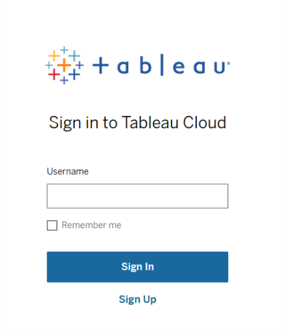
Will I need a new login?
Users will continue using their university credentials.
What is my Tableau Cloud Site URI (Site ID)?
Each Tableau Cloud site has a unique Site URI or Site ID.
If Tableau Cloud prompts you for a Site URI during sign-in, find your site on the URI CU Tableau Cloud Site Admin List (VPN required).
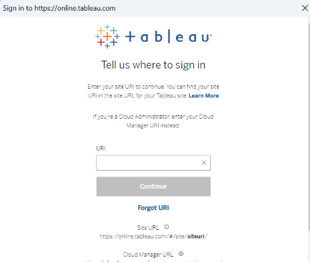
Having SharePoint document access issues? Email help@cu.edu.
Is VPN required to use Tableau Cloud?
Yes, VPN is required to access CU Tableau Cloud.
Will my bookmarks continue to work?
Bookmarked dashboard links will redirect to Tableau Cloud after your site goes live. Bookmarked project and folder links will require you to sign in to Tableau Cloud and navigate to the desired location manually.
Will there be downtime?
There will be a short peroid of downtime during each planned migration window. Site administrators will receive advance communication regarding their migration schedule.
Will Tableau Server still be available?
Yes. Tableau Server will be available during migration. After your site goes live in Tableau Cloud, you will no longer have access to Tableau Server for that site.
Can I continue publishing to Tableau Server during the migration window?
Yes, Tableau Server will remain available for publishing throughout the migration week.
However, any newly published content or updated content during the migration window must be republished to Tableau Cloud to ensure everything is fully transitioned after the migration.
How do I activate a Tableau Desktop license via Tableau Cloud?
If you have purchased a Tableau Desktop license or product key, you can activate your Creator license by signing in to Tableau Cloud directly through Tableau Desktop once you receive the Tableau Cloud URL. Refer to the How to Activate Your Tableau Desktop License via Tableau Cloud document for step-by-step instructions.
Where can I get help?
For additional questions about the Tableau Cloud Migration Project or for assistance during migration, email irmhelp@cu.edu for support.