




Effective Thursday, December 19, 2024, FIN users will see some changes to the Create/Update Journal Entries tile/functionality.
Here’s what to expect from this update – and what action you might need to do in response to it.
Change #1 – Journal Display Screens will include New Left-hand Menu (affects all users: no action is needed on your part)
After the FIN update: When you log into the Finance System and click the Create/Update Journal Entries tile

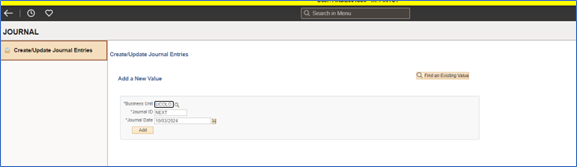
The Journal screens will otherwise look and behave as usual.
Change #2 – Create/Update Journal Entries Tile in New Location on Finance Pages (only affects users who have customized their Finance pages: your action may be required)
After the FIN update: When you log into the Finance System, the Create/Update Journal Entries tile
The Journal Entries tile will switch locations (moving to the bottom right of the page):
- If you customized a FIN page that has the Create/Update Journal Entries tile built into it – for example, if you customized the Finance & Accounting page, or the Finance Inquiry page.
- Action: You can click-and-drag the tile back to where you want it on your customized page.
The Journal Entries tile will be missing from the page:
- If you created a custom home page.
- Action: You can add the tile back to your custom home page. (See the how-to video/procedures on FIN Fluid Personalization.)
The Create/Update Journal Entries tile will not move or disappear if you have not customized these pages.
Update for mobile device users:
If you process journals on your cell phone or tablet, good news!
The Create/Update Journal Entries tile has not been available on small format screens for a while. However, with this FIN update, the tile will now be available on mobile devices.
Questions?
Contact FSS@cu.edu.