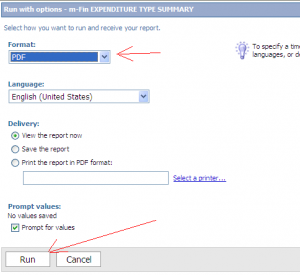
Run Directly To PDF
m-Fin reports will typically default to html output because that is the fastest. Once you see the html output you can click the pdf button (it is usually above the m-Fin logo) to re-render the report in pdf. But what if you know you are going to want pdf and don’t want this extra step?
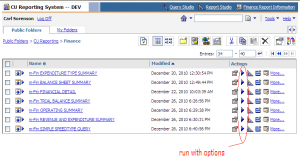
In the Cognos Finance folder, instead of clicking directly on the m-Fin report name link, hover the mouse over the little blue triangle over on the right on the same line as the report. Cognos calls this button “run-with-options”. A tool tip appears confirming which report you are going to run. Click and then pick “Format PDF” and then click the Run button.
Do not be tempted by the “Print the report in PDF format” option. Ignore that. Simply change the “Format” drop-down to pdf and then proceed as usual.