




When you add a new line to a journal, regardless of journal entry type (actual, budget, etc.), you can choose how the ChartFields copy down from the previous line onto the new line. You can:
- Copy the fields according to the default template, or,
- Select another template other than the default template, or,
- Select a template and modify it.
The default copy down is known as the FOPPSA template. This template copies the following ChartField values: Fund, Org, Program (or Project), Subclass (if present), and Account. Strictly speaking – it also copies down certain other basic ChartFields, such as Business Unit, Ledger, and Budget Year.
If you want the default FOPPSA template to apply, you don’t need to do anything. You will create your journal by entering the information on the first line, and adding additional lines by indicating how many lines you want to add, and selecting the plus sign.
The NOFOPPS template is also available to use, although it does not default for you.
The NOFOPPS Template copies:
- Account
- Business Unit
- Ledger
- Budget Year
Read the procedures
To select a template other than the default
-
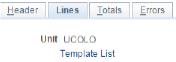
On the Lines page, click Template List.
-
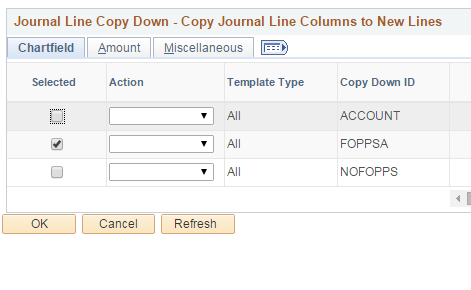
In the Journal Line Copy Down – Copy Journal Line Columns to New Lines section, select the box next to the template you want to use, then click OK.
-
No matter what template you pick, you can identify specific ChartFields that you do, or don’t, want to copy down to new lines. And you can always make changes, subsequently, to the lines themselves. To modify the template, check or uncheck any field, then click OK.
To change multiple lines at once
If after adding lines to your Journal Entry, you can use Change Values to change ChartField values on multiple lines, such as accounts or SpeedTypes.
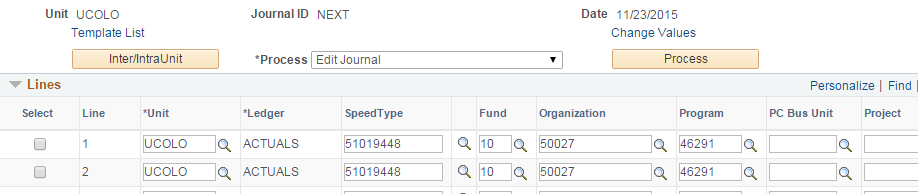
- On the Lines tab, make sure that the lines that you want to change appear on the lines tab. (You may need to change the default number of lines that are displayed on the tab). Click Change Values.
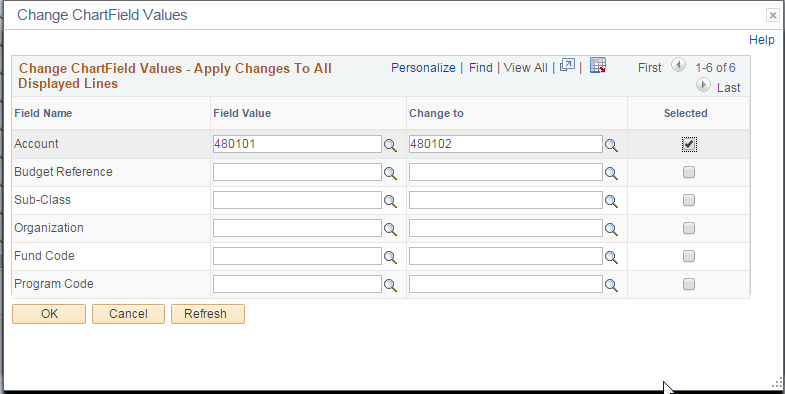
- The Change ChartField Values popup will open. Using the appropriate rows, identify the value(s) you want to change From and To. Notice that SpeedType itself is not listed. That’s because SpeedType is a calculated value (based on the FOPPS). To change SpeedType, simply identify whichever FOPPS fields you need to change in order to produce the desired SpeedType. Make sure to check the Selected box.
- Click OK.
- You’ll return to the Lines tab, and the lines displayed will show the changes.
For questions or feedback contact Have a question or feedback?